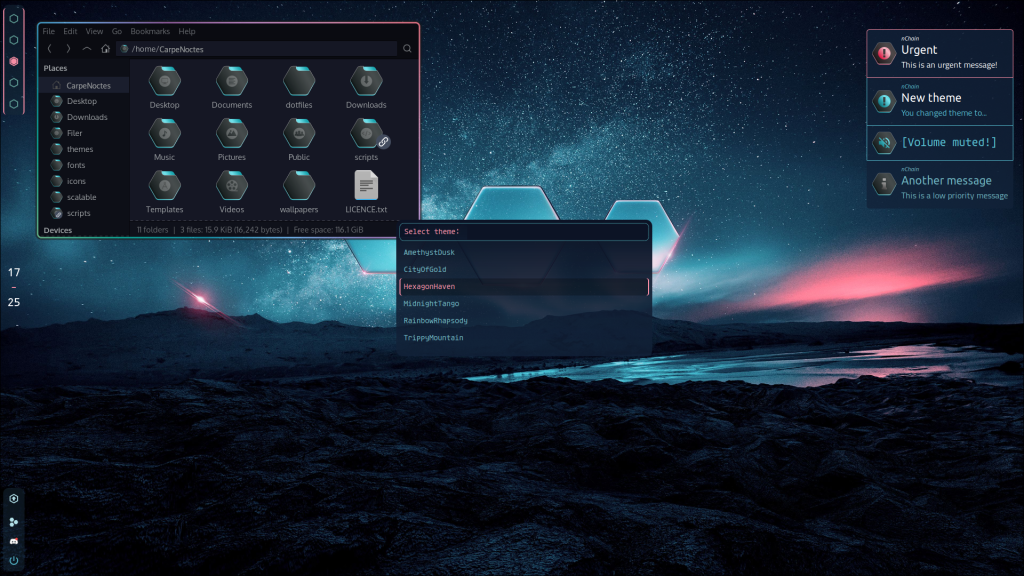
Currently, I’m using Arch Linux with Hyprland as my window manager. I prefer to maintain a consistent theme and color scheme across all my main services and applications, such as Waybar, Dunst, Kitty, Rofi, and Sublime (my primary editor).
Certainly, as many would agree, hexagons stand out as the epitome of geometric elegance (hexagons are bestagons), so this is a dedication to the unparalleled perfection of this shape.
Wallpaper
The wallpaper was found on the internet. You can download it from here
Icons
Introducing my inaugural icon pack! I’ve primarily designed folders and other icons, complemented by selections from the Avalon Icons pack, harmonizing with my dark grey base and bluish accents (albeit not exactly the same hue).
Waybar
All icons for waybar are from nerd fonts icons. I was delighted to find a large enough set of hexagon-shaped icons to use them for battery status as well as network connectivity.
When using multiple screens, the persistent groups (i.e. workspaces) also provide handy indicators of what is active across screens.
Rofi
The Rofi theme is relatively straightforward, mirroring the background color of dunst notifications, with a hint of transparency.
Setup
- Distro: Arch linux
- WM: Hyprland
- Display manager: SDDM (with modified version of Sugar candy theme)
- GTK theme: Juno Ocean
- Font: Oxygen
- Bar: waybar
- Notification daemon: dunst
- Shell: zsh
- Terminal emulator: kitty
- File manager: Thunar (with tumbler plugin for custom folder thumbnails)
- Launcher: rofi (also used for menu, calculator, task list manager etc)
- Editor: Sublime
- Theme changer: nChain
In essence, my setup is meticulously crafted to blend functionality with aesthetic appeal, honoring the seamless beauty of hexagons throughout.